
Schedule Analysis · For access and template redesign
Find the access a medical group already has.
Schedule Analysis puts every specialty's referral demand against the template time it offers, says whether the problem is too little supply or the wrong supply, and turns that into specific changes to each provider's template. Rankings show which clinics already get it right, so the redesign starts from the group's own best practice.
- Is this specialty short of providers, or short of the right slots?
- Which referrals are waiting while template time goes unused, and at what times of the week?
- Which templates should change first, and to what?
- Which clinics and providers already meet demand well with the same resources, and what do they do differently?
The tour
From the gap to the template change, in two minutes.
Supply against demand, the clinics and providers to start with, the template changes to make, rankings, and how each change is measured. Demo data: made-up clinics, providers and figures.
1 · Demand against supply
Short of providers, or short of the right slots?
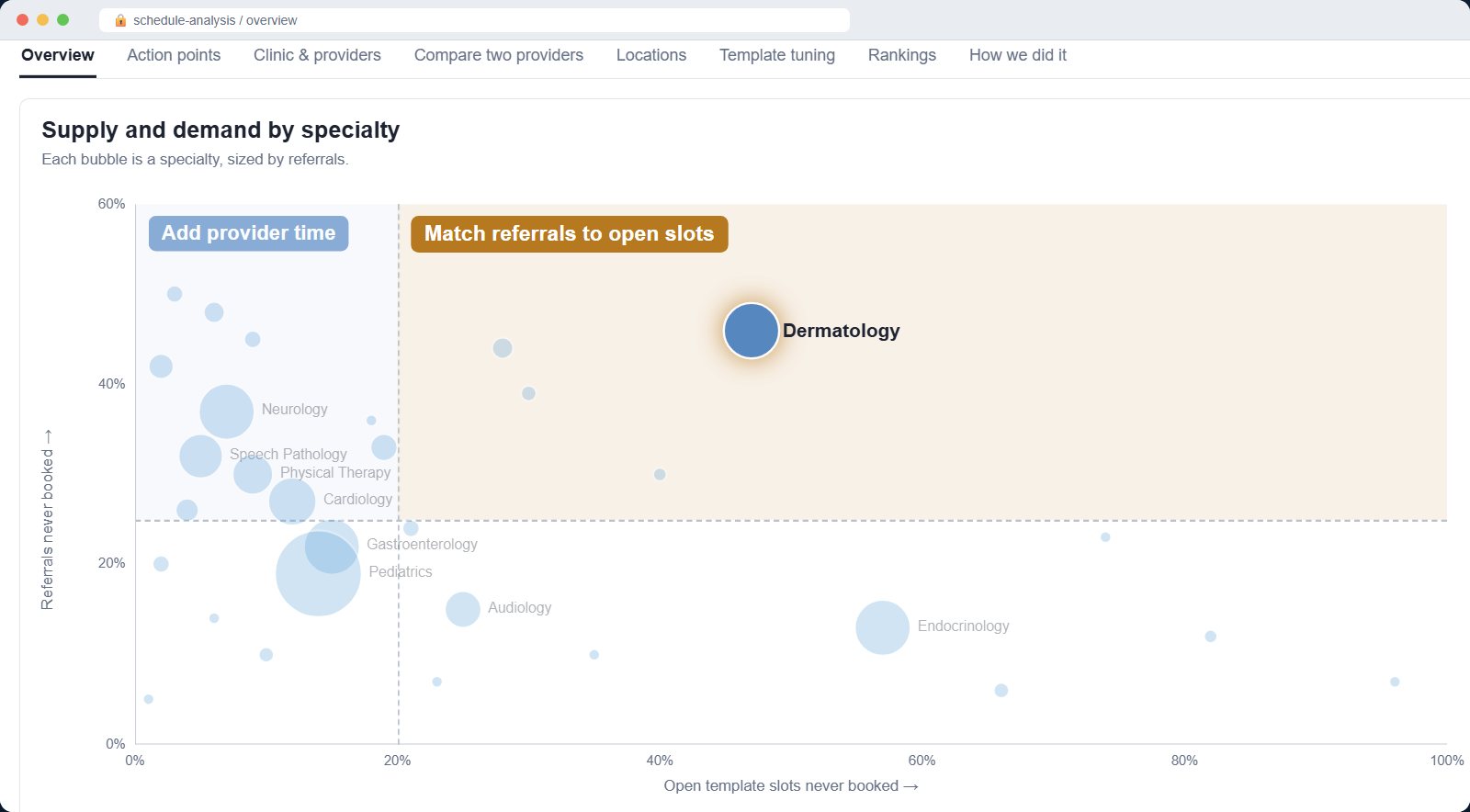
It's the first question in any access engagement, and usually the most expensive one to get wrong. For each specialty, referrals that went unbooked for want of a suitable appointment are set against how much of the template went unbooked over the last 12 months. The answer is one of four verdicts, each pointing to a different fix.
Hardly any template time goes unbooked, yet referrals still go unbooked for want of an appointment. This is the case for more provider time, made with numbers.
A tenth or more of the template is never booked while referrals go unbooked. The fix is matching referrals to the open time — the wrong slot types, times or booking rules — not hiring.
Between a twentieth and a tenth of the template goes unbooked: there is some open time, but not enough of the right kind.
Fewer than 50 referrals went unbooked for want of a time. If template time is still going unused, trim it and put the hours where they are needed.
Every referral, followed to the visit
Each referral is linked to the visit it produced and sorted by where it came from: outside providers, patients and families, your own providers, and follow-up orders. Each source gets its own days to visit and share seen within 14 days.
Why the unbooked ones weren't booked
Schedulers' close-out reasons are grouped into supply (no suitable time, too far, offered times didn't fit), process (missing information, insurance, sent back), patient and unknown. Only supply reasons, and referrals that expired without being worked, count against the template — so the case for change rests on demand the schedule failed to meet.
Hidden demand
New patients seen with no referral for that specialty in the year before — patients who came another way, such as a phone call. They never show up in a referral backlog but still use new-patient time.
Demand by specialty, supply by clinic
An unbooked referral has no clinic, so demand is judged across the specialty, then each clinic is shown against it. That stops a busy clinic hiding an idle one down the road.
2 · Where the template leaks
See why the time goes unused, not just how much.
Every slot on every template is followed to what happened to it — seen, refilled after a loss, lost and left empty, or never booked — so each kind of waste can be traced to its cause and its owner.
Time nobody books
Hour-by-weekday grids of template time offered on six or more days and mostly never booked: the blocks to retire or repurpose.
Booked, lost and not refilled
Kept apart from never booked, because one is a template design problem and the other is an operations problem — reminders, wait-list and refill practice.
Demand the template doesn't show
Overbooks and patients seen in admin or held time, with how far ahead they were booked: real demand squeezed in around a template that doesn't make room for it.
The shape of the clinic day
Non-patient time scattered between a provider's first and last slot, admin blocks used for patients, and where new and follow-up visits land by day and hour.
How busy days hold up
No-shows and same-day cancels by how heavily a day was booked, and the point where they climb — a booking ceiling grounded in each provider's own history.
Who misses appointments
No-show rates by age band, language, payer group and prior no-shows, flagged only when the gap is large and the group big enough to trust.
3 · Template suggestions
A first draft of every provider's new template.
Template tuning reads each provider's current template against what was booked and against the specialty's unmet demand, and proposes a short list of changes. Each one carries the sessions behind it, a confidence level and its expected effect — a draft you take into the room with the physician and refine, not a black box.
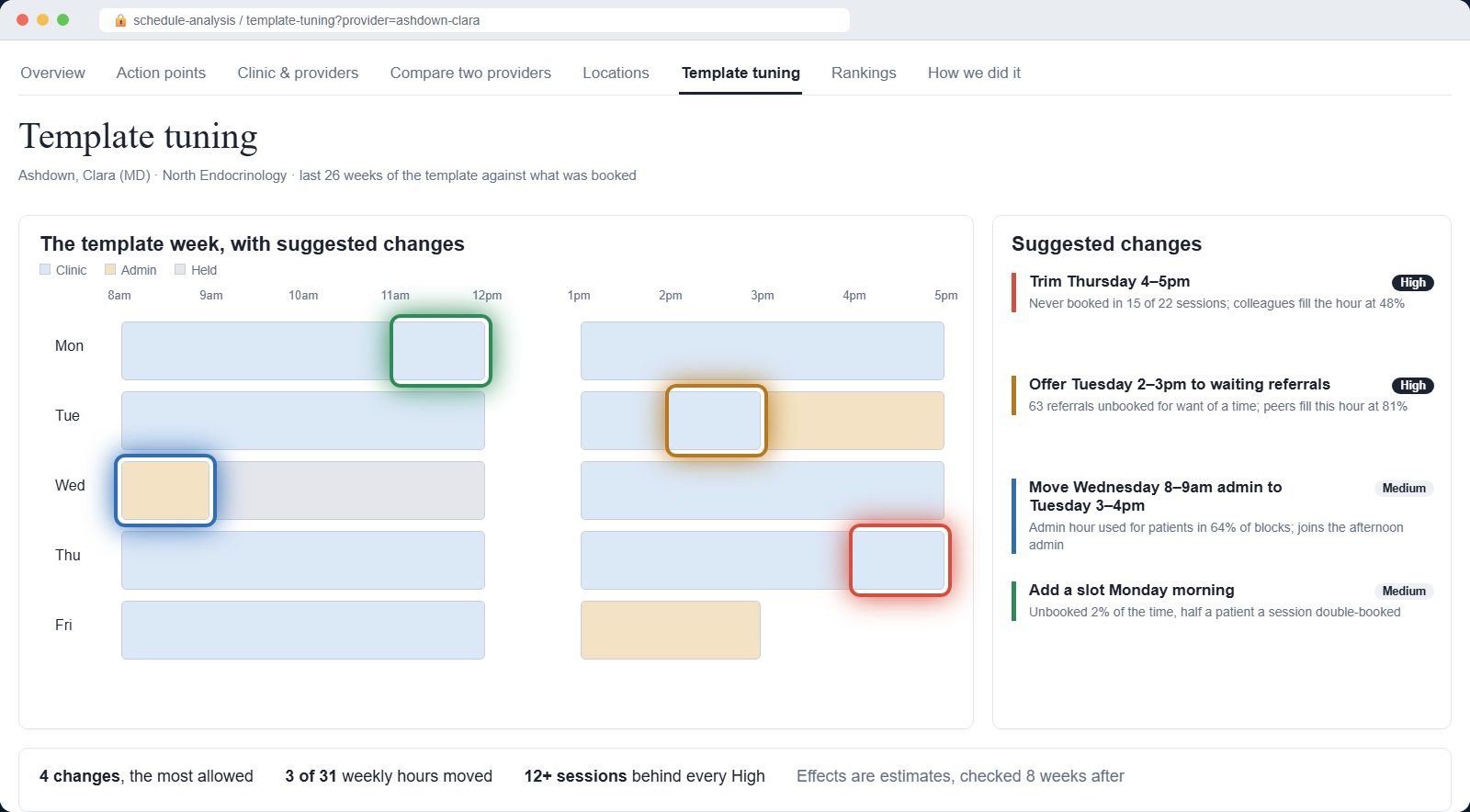
- Add a slotWhere almost nothing goes unbooked, patients are already being double-booked in, or the specialty books far ahead. The time comes from admin or approval-only time, or a slightly longer session — never past the provider's busy-day ceiling.
- Offer an hour to waiting referralsWhen 50 or more referrals went unbooked for want of a time, an hour that this provider often leaves unbooked but colleagues fill at 75% or better is given to the referral worklist before anything is cut.
- TrimSlots that stay empty most sessions, or a whole hour when half or more of it is never booked.
- Move admin timeSwap a regular admin hour or half-day with clinic time of the same length, so admin sits together and patient time sits where patients book.
Small enough to get agreed
- ✓ Built from the last 26 weeks of each provider's template against what was actually booked
- ✓ Nothing from fewer than 8 sessions; High confidence needs 12+ sessions with the pattern in 60% of them
- ✓ At most four changes per provider, moving no more than a tenth of their weekly hours — the rest listed as next in line
- ✓ Each change shows its expected effect, and is checked 8 weeks after it goes live
4 · Rankings
Benchmarks from inside the group.
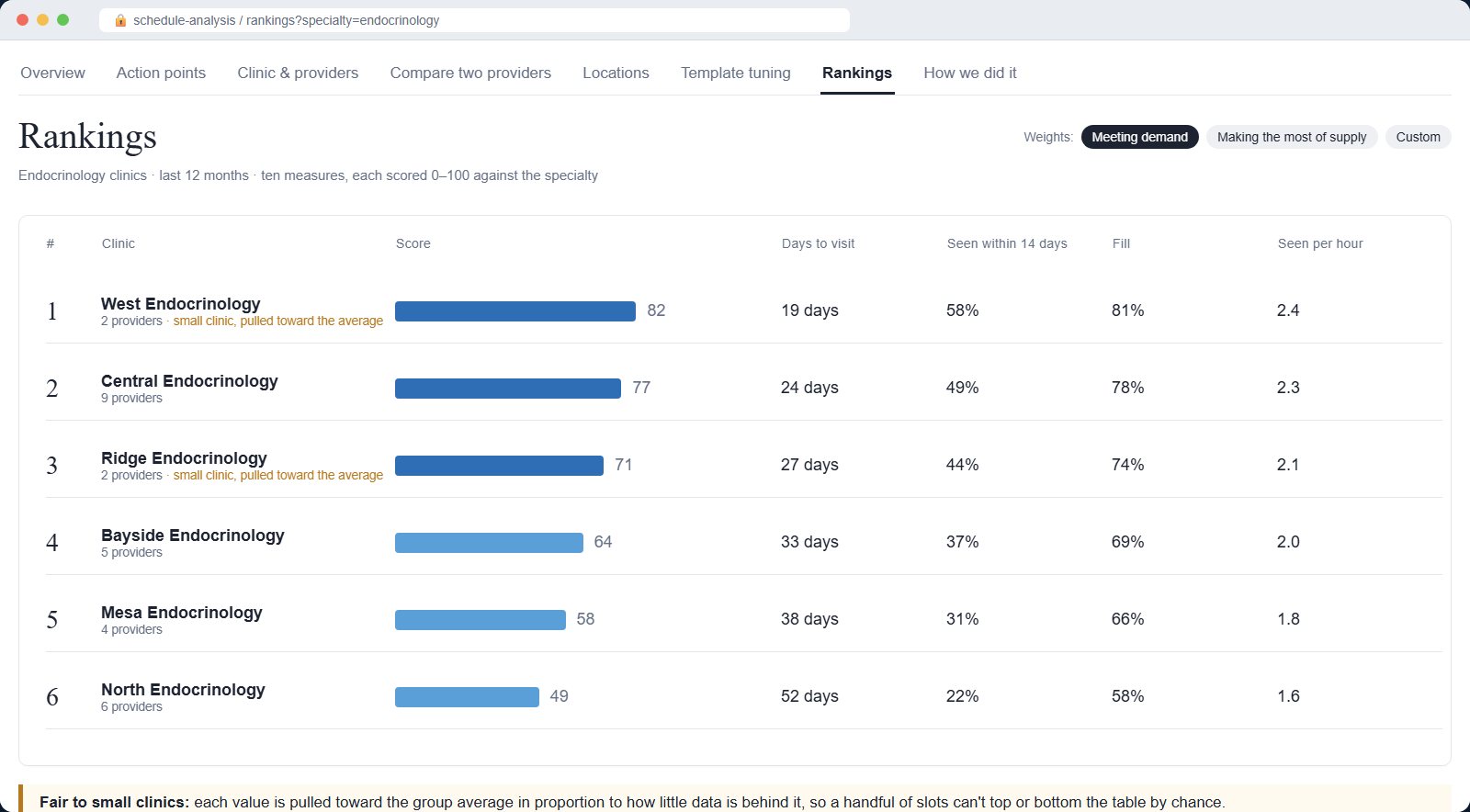
A league table of clinics or providers on how well they meet demand with the time they have: ten weighted measures, compared like with like.
- Referrals met
- Referrals unbooked for want of a time
- Days to visit
- First appointment within 14 days
- Referrals seen per clinic day
- New-patient share
- Fill
- Lost and not refilled
- Never booked
- Patients seen per template hour
- Find the internal best practiceThe clinic that gets outside referrals seen within 14 days on the same resources as its neighbours is the model to copy — and your proof that it can be done here.
- Decide where to startRank every clinic in a specialty, or every provider in a clinic, and take the bottom of the table into the first wave of redesign.
- Set targets people acceptEvery measure is scored 0 to 100 against the same specialty in the same group, so targets come from what colleagues already achieve, not a national benchmark the physicians will argue with.
- Hold fair conversationsLike-for-like groups, and small clinics pulled toward the group average in proportion to how little data they have, so a clinic with a handful of slots can't top or bottom the table by chance.
- Weight it to the engagement's goalPresets for meeting demand or for making the most of supply, and sliders to set your own weights, so the table answers the question the client is actually asking.
How it fits an engagement
Assess, prioritise, redesign — and prove it.
Schedule Analysis doesn't replace your judgement on templates, referral pathways or clinic design. It gives you the evidence for each step, and keeps measuring after the engagement ends.
- 01Assess
Supply against demand for every specialty and clinic on day one, with the verdict and the size of the gap — no data request, no months of extracts.
- 02Prioritise
Rankings and action points pick the clinics and providers to start with, and the internal exemplars to learn from.
- 03Redesign
Template tuning gives a guarded first draft for each provider; you refine it with the physician, using peer comparisons they accept.
- 04Prove it
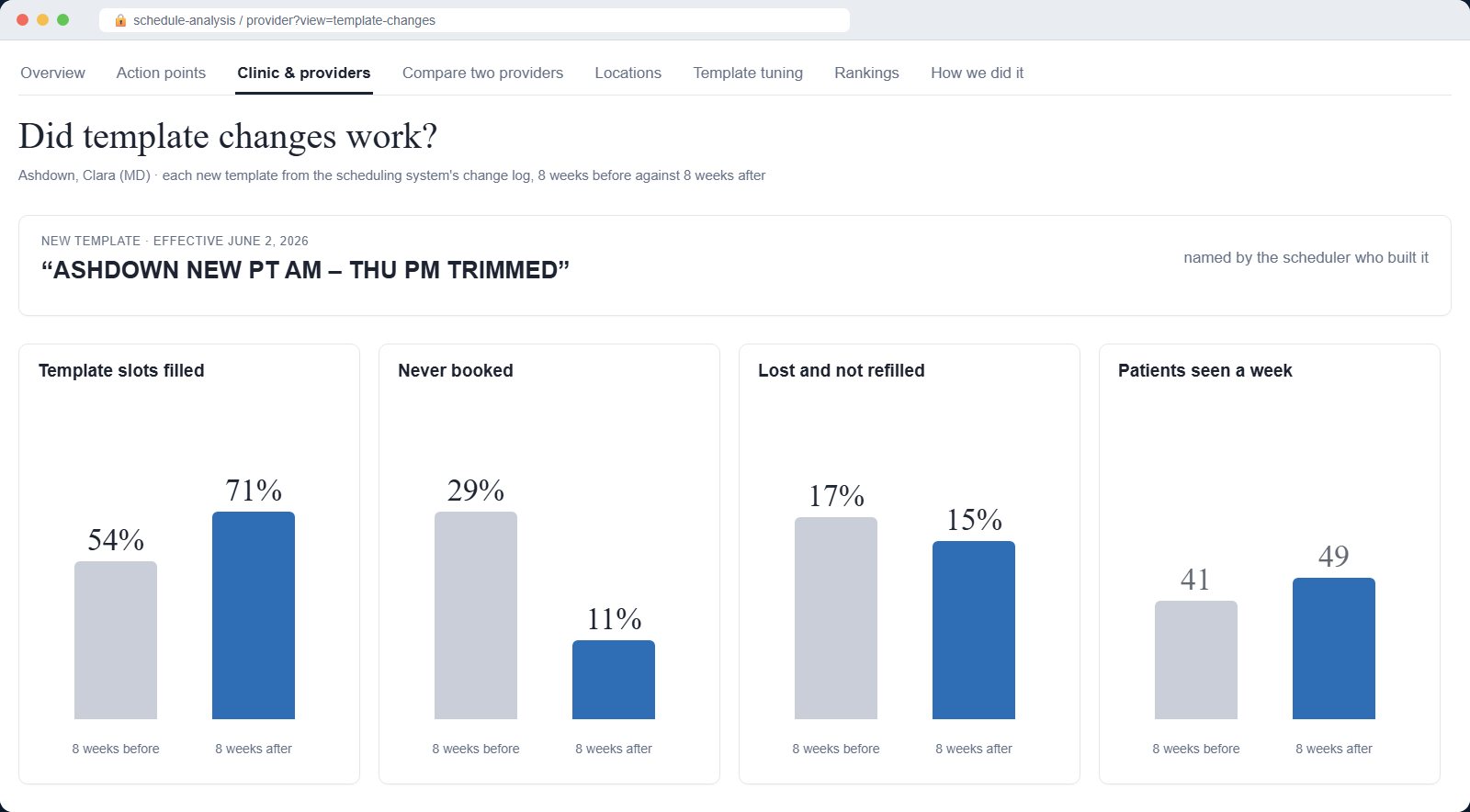
Each new template is picked up from the scheduling system's change log and measured 8 weeks before against 8 weeks after. The analysis rebuilds nightly, so the client keeps the same view after you've gone.
For the client's IT and compliance review
Reads the schedule. Changes nothing.
Read-only
Reads scheduling data and writes only to its own tables. It never changes a template or an appointment.
Aggregates by default
Clinic- and provider-level views. Patient drill-through shows MRN, sex and age only, and every request is logged.
Runs in the client's environment
Stored procedures in their own data warehouse and a small web app on their own server, with directory sign-in and a full audit trail.
Nightly from the appointment history, the template slot grid and the referral worklist at a large pediatric health system.
The analysis runs on three standard extracts every major system can produce: appointments, template slots and referrals.
Built inside a large pediatric health system's clinic network, by people who sat in the template meetings.
Bring it to your next access engagement.
We'll walk through the tour with you, talk through the client's scheduling extracts, and show where Schedule Analysis fits your assessment and redesign work. No obligation.
Ask us about Schedule Analysis